














M2 Casino Malaysia: Slots, Live Casino & Sports in One Account
M2 Casino brings Malaysia's favourite game types together behind a single login. Spin reels from well-known slot studios, sit down at a live baccarat or roulette table streamed in real time, or follow football and other sports with pre-match and in-play odds. Everything runs in Ringgit and loads on your phone as smoothly as on a laptop.
Members get access to regular rebates and seasonal promotions, a cashier that works with local banks and e-wallets, and a support team you can message at any hour.
Think of M2 as an online casino for Malaysia that keeps things simple: one wallet, one set of login details and one place to find every game. This page walks you through what M2 offers, how to sign up and log in, how payments and rebates work, and how to keep your play safe and enjoyable.
First time here? Registration is free and takes about a minute. Once you're verified, you can top up and explore every game category from the same account.
Browse M2 Casino Game Categories
Pick a tab to narrow the lobby. Slot studios, live dealer rooms and sports books each have their own style, so try a few and see what suits you.




















M2 Slots: Studios, Styles and How to Choose
Slots are the busiest part of the M2 lobby. You'll find games from Lucky365, Monkey King, Microslot, JILI, JDB, AskMeSlot, Pragmatic Play, Playtech and Fa Chai, so there's a wide mix of themes, reel layouts and bonus features to explore. Some titles lean on classic fruit-machine symbols, while others are built around Asian folklore, adventure stories or fishing-style action.
How to play M2 slots
- Pick a studio or a theme. Use the Slots tab to browse by provider, or open a game that catches your eye.
- Read the paytable. Every slot has an info or "i" button that explains the symbols, paylines and bonus rounds.
- Set your bet size. Choose a stake that lets you enjoy plenty of spins within the budget you've set for the session.
- Spin and track your balance. Your wallet updates after each round, so it's easy to see where you stand.
Tips for choosing a slot
- Check the RTP. Return to player is a long-term average, not a promise for one session, but it's a useful way to compare games.
- Match volatility to your style. Low-volatility slots tend to pay smaller amounts more often; high-volatility slots pay less often but can pay more when they do.
- Try a few studios. Each provider has its own feel, from fast, simple reels to feature-heavy games with free spins and multipliers.
Want the detail? Our guide to slot RTP and volatility explains both ideas in plain language, and the popular games page highlights titles players keep coming back to.
M2 Live Casino: Real Dealers, Streamed in Real Time
The M2 live casino brings a real table to your screen. Professional dealers run each round on camera while you place bets from your phone or laptop. Live rooms come from Sexy Baccarat, Hotroad, Evolution, Playtech Live, Big Gaming and Pragmatic Play Live, each with its own studio look and table layouts.
Baccarat is the favourite for many Malaysian players, and you'll also find roulette and other classic table games depending on the studio you choose.
How a live round works
- Choose a table. Open the Live Casino tab, pick a studio and join a table that fits your stake.
- Place your bet in the timer window. A countdown shows how long you have before betting closes.
- Watch the result. The dealer deals the cards or spins the wheel, and winnings go straight to your balance.
Live casino tips
- Use a stable Wi-Fi or mobile data connection so the stream doesn't drop mid-round.
- Watch a couple of rounds before you bet to get used to the table's pace and layout.
- Decide on a session budget first. Live games move quickly, so it helps to know your limit before you sit down.
M2 Sports Betting and Specialty Games
If you prefer following a match to spinning reels, M2 sports betting runs through MaxBet. You can bet on football and other sports before kick-off or while the action is live, all from the same wallet you use for slots and live tables.
Getting started with sports bets
- Start with simple markets. A single bet on the match result is the easiest way to learn how odds and payouts work.
- Know the difference between pre-match and in-play. In-play odds shift as the game unfolds, so prices can change quickly.
- Check your bet slip. Confirm the market, the odds and your stake before you tap to place the bet.
Cockfighting, horse racing and arcade games
M2 also covers a few specialty categories. SV388 offers cockfighting markets, RCB988 brings horse racing, and Gogoli and Marblex add arcade-style games for a change of pace. These games play quite differently from slots, so take a moment to read the rules inside each one before placing a bet.
Why Malaysian Players Choose M2 Online Casino
M2 is designed around the way people in Malaysia actually play. Here's what that means day to day:
- Everything in Ringgit. Your balance, bets and payments are all in MYR, so there are no currency conversions to work out.
- Local payment methods. Top up with FPX, DuitNow, Touch 'n Go eWallet or GrabPay, the same services you already use for shopping and bills.
- Support in your language. Message the team in English, Bahasa Malaysia or Mandarin, at any hour, on WhatsApp or Telegram.
- Mobile first. The lobby, cashier and live tables are built for a phone screen, whether you use the browser or the app.
- One account for everything. Slots, live casino, sports and specialty games all share a single wallet and a single login.
Open an M2 Account in Three Steps
Signing up works the same way on mobile and desktop. There are no forms to print and no documents to upload before you start.

Tap Register
Hit the orange Register button at the top of any page. The sign-up form opens in the same window on phone or desktop.

Add Your Details
Pick a username, set a strong password and enter a Malaysian mobile number so we can send you a one-time code.

Confirm and Play
Key in the code, and your account is live. Make a first top-up through FPX, DuitNow or an e-wallet and choose a game.
Log In From Any Device
Your M2 account follows you from phone to laptop. Sessions are protected with encryption and suspicious login attempts are blocked automatically.
Android
Runs on most Android phones and tablets from the last few years. Install the app, or keep it simple and play in Chrome.
Setup guideiPhone & iPad
Add M2 to your home screen from Safari for an app-like shortcut, or follow the iOS install steps on our download page.
Setup guideAny Browser
No download needed. Chrome, Safari, Edge and Firefox all load the full lobby, cashier and account settings.
Setup guideM2 on Your Phone
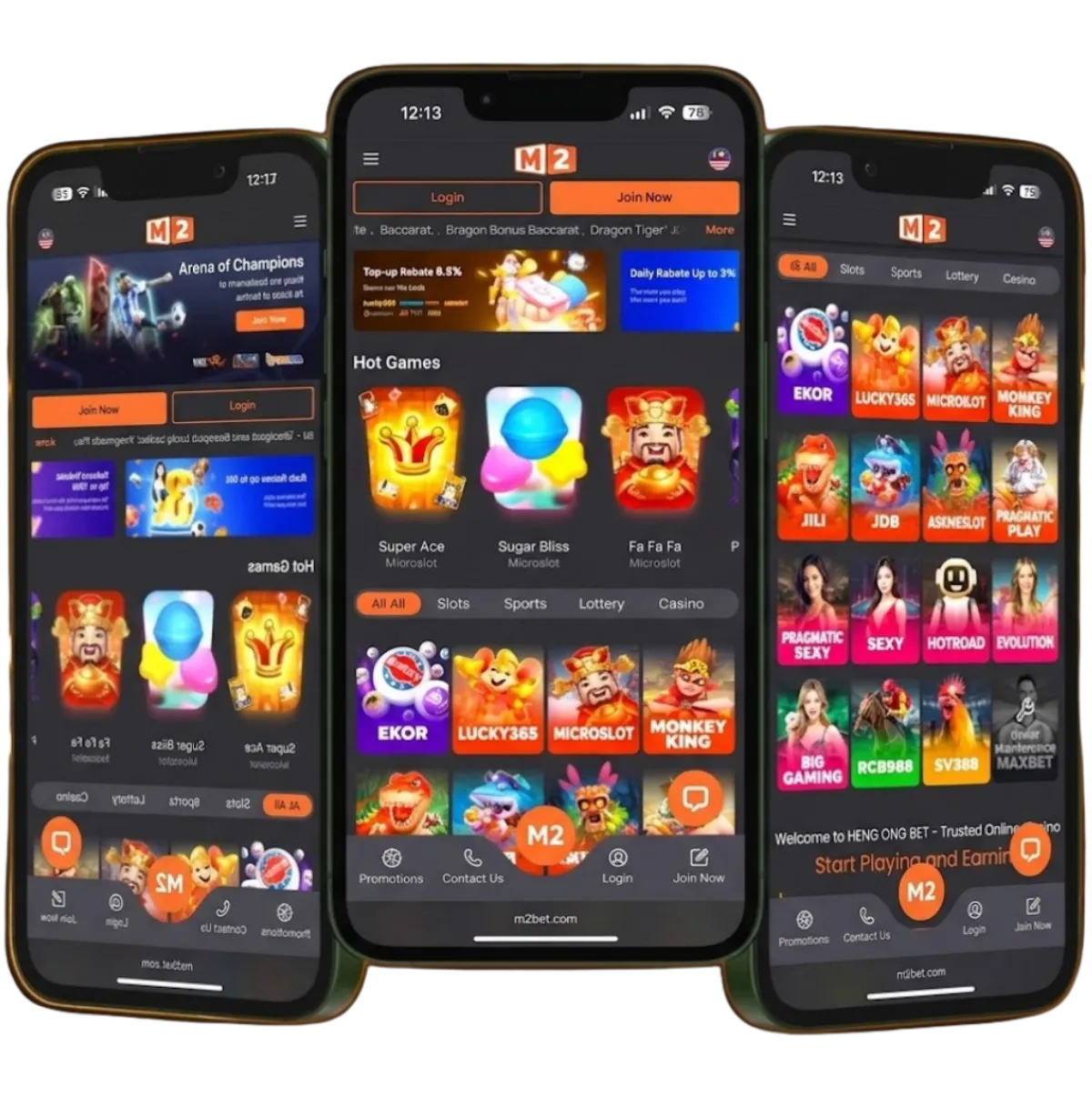
Most M2 players spend their time on mobile, so the lobby, cashier and live tables are designed for a phone screen first. Games scale to portrait or landscape, and the menu stays within reach of your thumb.
The browser version covers everything. If you play often, the M2 app is worth the small download for the extras below.
What the M2 App Adds
- Quicker game launches: Graphics are stored on your phone after the first load, so slots and live tables open without waiting.
- Fingerprint or Face ID: Sign in with the biometrics already on your phone instead of typing a password in public.
- Promo notifications: Opt in to alerts and you will hear about new rebates and limited-time offers as soon as they go live.
- Fewer interruptions: The app runs on its own, so a stray tab or a browser update will not cut off a live round.
- Built for thumbs: Buttons, bet chips and menus are sized for one-handed play on a small screen.
M2 Casino Download and Mobile Setup
Getting M2 on your phone only takes a few minutes. Android users can install the app, while iPhone and iPad users can add M2 to the home screen from Safari or follow the iOS steps on the M2 Casino download page. If you'd rather not install anything, the browser version gives you the full lobby, cashier and account settings.
Only install the app using the official links on this site, and keep your phone's operating system up to date. Our mobile setup guide covers permissions, home-screen shortcuts and common install questions.
Top-Ups and Withdrawals in Ringgit
The M2 cashier works with payment services Malaysian players already trust. Every transaction is in MYR.
- FPX: pay straight from your online banking account with a participating Malaysian bank.
- DuitNow: transfer using the DuitNow service supported by local banks.
- Touch 'n Go eWallet: top up from the e-wallet already on your phone.
- GrabPay: use your GrabPay balance if that's your everyday wallet.
How to top up
- Log in and open the cashier from the menu.
- Choose your payment method and enter the amount.
- Confirm the payment in your bank or e-wallet app, then return to M2. Your balance updates once the payment is confirmed.
How to withdraw
Open the cashier, choose Withdraw, enter the amount and confirm your bank details. Double-check the account number before you submit, and keep a screenshot of the request in case you need to contact support. If you have an active promotion, read its terms first, as some offers need to be completed before a withdrawal.
The top-up and withdrawal guide walks through each method with screenshots, and our article on deposit and withdrawal security explains how to keep your payments safe.
Daily Rebates and Member Rewards Explained
A rebate returns part of your play to your account, whether a session goes your way or not. At M2, members can receive a daily rebate of up to 10%.
- Settlement period: 12 PM to 11:59 AM.
- Credited: daily at 3 PM.
- Rate and eligibility: listed with the full terms on the promotions page.
Alongside rebates, M2 runs seasonal promotions and rewards for regular members. Offers change over time, so the M2 promotions page is always the place to check what's live and what conditions apply. If a rule isn't clear, ask support before you claim.
A rebate is a nice extra, not a reason to play more than you planned. Stick to your budget and treat any reward as a bonus.
Support in Three Languages, 24/7
Stuck on a top-up, a bonus rule or a login? Message a real person at any time of day. Our team replies in English, Bahasa Malaysia and Mandarin.
How M2 Keeps Your Account Safe
Security is built into every step, from the moment you sign in to the moment a withdrawal reaches your bank.
Encrypted Connection
Every page and payment on M2 travels over TLS encryption, the same kind of protection your banking app uses.
Two-Step Sign-In
Switch on two-factor authentication in your account settings and each new device will need a code before it can log in.
Audited Game Results
Our slots and table games come from licensed studios whose random number generators are tested by independent labs.
Protected Payments
Top-ups and withdrawals are handled by established Malaysian payment gateways. We never see or store your online banking password.
Play Responsibly
Gaming should stay fun. M2 gives every member simple tools to stay in control:
- Daily, weekly or monthly deposit limits
- Reminders that show how long you've been playing
- Cooling-off periods and self-exclusion
- Links to free, confidential support services
You must be 18 or older to play. Read more on our responsible gaming page.
Signing In to M2 Casino
Already a member? Here's the quickest way back to your games, and what to do if something gets in the way.
Log in in three steps
- Open the login form. Tap Login at the top of the page, or open the M2 app.
- Enter your username and password. Passwords are case-sensitive, so check that Caps Lock is off.
- Tap Sign In. You'll land in the lobby with your balance and recent games on screen.
Forgot your password?
Choose "Forgot password" under the login form and enter the mobile number linked to your account. We'll send a one-time code by SMS or WhatsApp, and you can set a new password straight away. Mix upper- and lower-case letters with numbers to keep it strong.
Account locked?
Several wrong passwords in a row will lock the account for a short time, which stops anyone else from guessing their way in. Message support, confirm a few details, and your access will be restored. See the full M2 Casino login guide for more fixes.
New to M2? Here's What You Get
Joining M2 costs nothing and there's no minimum play requirement. Once you're registered you can:
- Claim the current welcome offer, with the terms on our promotions page
- Try slots, live tables and sports from one wallet, without extra accounts
- Top up in Ringgit using FPX, DuitNow or an e-wallet
- Reach support around the clock if you need a hand
Follow the M2 Casino registration guide for screenshots of each step.
Guides to Help You Get More From M2
New to online casino games, or just want to brush up? These guides answer the questions we hear most often:
- How to register and how to log in, with fixes for common sign-in problems
- Setting up M2 on your phone for Android, iPhone and iPad
- Slot RTP and volatility, explained without the jargon
- Keeping deposits and withdrawals secure
- Responsible gaming tools and where to find support
Browse the M2 blog for more articles, or see the full M2 Casino FAQ if your question isn't answered below.
Frequently Asked Questions
Is M2 Casino available in Malaysia?
Yes. M2 is built for Malaysian players. Accounts are in Ringgit (MYR), payments run through local banks and e-wallets, and support speaks English, Bahasa Malaysia and Mandarin.
How do I register for an M2 Casino account?
Tap Register, choose a username and a strong password, and enter a Malaysian mobile number. Key in the one-time code we send you and your account is live. Most players finish in about a minute, and there are no documents to upload before you start.
How do I log in to M2 Casino?
Tap Login at the top of any page or open the M2 app, then enter your username and password. Passwords are case-sensitive. If you forget yours, choose "Forgot password" and we will send a one-time code to the mobile number linked to your account.
Do I have to download the M2 Casino app?
No. The full site works in any modern mobile or desktop browser. The app is optional and mainly adds biometric login, faster loading and promo notifications. iPhone and iPad users can also add M2 to the home screen from Safari.
Which payment methods can I use?
FPX online banking, DuitNow, Touch 'n Go eWallet and GrabPay are supported, and every transaction is in Ringgit (MYR). See the Top-up & Withdrawal Guide for the step-by-step process.
What games does M2 have?
Slots from studios such as Lucky365, JILI, JDB, Pragmatic Play, Playtech and Fa Chai; live dealer tables from Evolution, Sexy Baccarat, Big Gaming and more; sports betting through MaxBet; plus cockfighting on SV388, horse racing on RCB988 and arcade-style games from Gogoli and Marblex.
How does the M2 daily rebate work?
Members can receive a daily rebate of up to 10%. Each settlement period runs from 12 PM to 11:59 AM, and the rebate is credited daily at 3 PM. The rate and full terms are listed on the promotions page.
Is M2 Casino safe to use?
Every page and payment travels over TLS encryption, you can switch on optional two-factor authentication for extra login protection, and games come from licensed studios whose random number generators are tested. Payments are handled by established Malaysian gateways, and M2 never sees your online banking password.
How can I contact M2 Casino support?
Support is available 24/7 on WhatsApp and Telegram. The team replies in English, Bahasa Malaysia and Mandarin, and can help with registration, logins, top-ups, withdrawals and promotion rules.
Who can play at M2 Casino?
You must be 18 or older to open an account and play. M2 also offers deposit limits, session reminders, cooling-off periods and self-exclusion so you can keep your play under control. Visit the responsible gaming page for details.
Start Playing Today
Open a free M2 account, pick a game you enjoy and play at your own pace. Set a budget first and treat every session as entertainment.
Play Now